Why Most Brands Wing It — and Pay the Price
Most growing businesses share the same content problem: they post when inspiration strikes, scramble for ideas at the last minute, and go completely quiet when things get busy. The result is an audience that forgets you exist, platforms that bury your reach, and a growing suspicion that content just doesn't work for you.
It does work. You just need a plan.
A content calendar won't write your posts for you. But it will make sure every post you publish has a purpose, a place, and a time — so you're building something intentional instead of just filling a feed.
What a Content Calendar Actually Is
Strip away the fancy tools and colour-coded spreadsheets. At its core, a content calendar answers three questions for every piece of content you plan to publish:
What — the format and the topic
Where — the platform it's going to
When — the date it goes out
That's the foundation. Everything else — captions, hashtags, visuals, campaign themes — layers on top of it. You don't need a premium tool to start. A simple spreadsheet, a Notion table, or even a printed sheet of paper will do the job.
Step 1: Start With Your Goal, Not Your Platform
Before you write a single date on a calendar, you need to know what you want this month's content to achieve. Not having a clear goal is the number one reason content plans fall apart — you start posting without knowing what you're pointing people towards.
Common monthly goals include:
Build brand awareness and grow your following
Drive traffic to your website or a specific landing page
Generate enquiries, leads, or direct sales
Educate your existing audience and deepen trust
Re-engage a following that's gone quiet
Pick one primary goal for the month and let everything on your calendar serve it.
Step 2: Define Your Content Pillars
Content pillars are the three to five core themes you return to consistently. They keep your feed varied without being scattered, and they build a clear mental link between your brand and the topics your audience cares about.
Here are examples for different brand types:
A branding agency: Education, Client Proof, Brand Thinking, Behind the Scenes
A product business: Product Features, User Stories, Lifestyle, Community
A service provider: Tips and How-Tos, Client Results, Industry Perspective, Personal Story
When you're stuck for ideas, go back to your pillars. They'll always point you somewhere useful.
Step 3: Decide on Your Frequency and Formats
More is not better. A posting rhythm you can sustain beats a frantic burst followed by silence every single time. Here's a sustainable baseline to build from:
| Platform / Channel | Recommended Start Frequency | Formats That Work |
|---|---|---|
| 3–4 posts per week | Reels, carousels, Stories, single images | |
| 2–3 posts per week | Text posts, articles, carousels, short videos | |
| Blog / Website | 1–2 posts per month | Long-form articles, how-to guides, case studies |
| Email Newsletter | 2–4 per month | Curated tips, exclusive insights, offers |
| X (Twitter) | 5+ posts per week | Short insights, threads, replies |
Choose the channels where your audience already spends time — not the ones you feel you should be on. Two platforms done consistently will always outperform six platforms done poorly.
Step 4: Structure Your Month by Week
A month without structure is just a list of dates. Give each week a loose theme or focus — not so rigid that it limits you, but clear enough to guide your topic selection without starting from a blank page every Monday.
A simple weekly rhythm looks like this:
Week 1 — Introduce. Launch the month's theme. Publish your cornerstone piece: the blog post or long-form content that anchors everything else this month.
Week 2 — Educate. Go deeper on a sub-topic from Week 1. This is a good week for a how-to, a tip series, or an explainer carousel that earns saves and shares.
Week 3 — Prove. Share client results, testimonials, before-and-afters, or case study highlights. Let your work do the talking.
Week 4 — Connect. Get personal. Ask a question, share an opinion, show what's happening behind the scenes. Close the month by inviting your audience to take a clear action.
Step 5: Fill in the Dates
Now you're ready to build the actual calendar. Work through the month and assign content using the structure you've established. For each entry, capture the following:
The date it goes out
The platform or channel
The content type (blog, reel, email, carousel, etc.)
The topic or working title
Which content pillar it falls under
The call to action — what do you want people to do next?
Don't wait until every detail is figured out before writing things down. A topic and a date is enough to get started. You can fill in captions and creative details closer to the time.
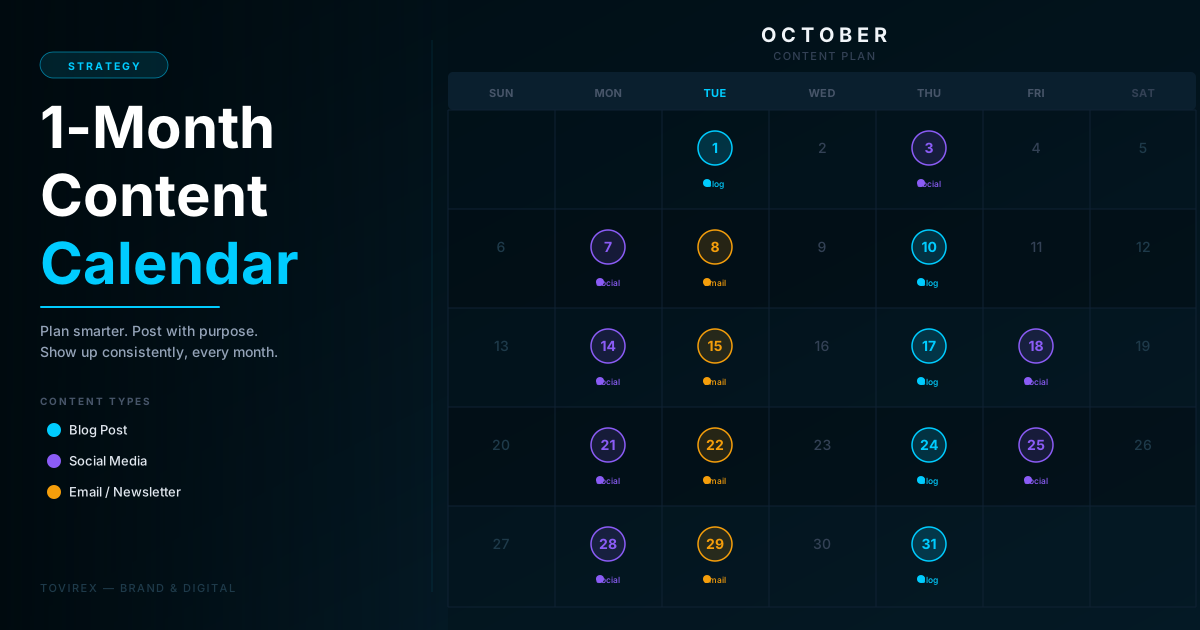
A Simple 1-Month Content Calendar Template
Here's how a starter plan might look for a brand publishing to Instagram and an email list, with one blog post per fortnight:
| Week | Day | Platform | Type | Topic |
|---|---|---|---|---|
| Week 1 | Tuesday | Website | Blog Post | Cornerstone article tied to the month's goal |
| Week 1 | Thursday | Carousel | 3 key takeaways from the blog post | |
| Week 2 | Tuesday | Newsletter | Tip of the week + link to the blog post | |
| Week 2 | Thursday | Reel | Quick how-to related to your main service | |
| Week 3 | Monday | Static Post | Client result or testimonial | |
| Week 3 | Wednesday | Newsletter | Case study or success story | |
| Week 4 | Tuesday | Website | Blog Post | Supporting article — FAQ, list, or deep-dive |
| Week 4 | Thursday | Carousel | Monthly roundup: what we covered this month | |
| Week 4 | Friday | Newsletter | Wrap-up + invite to book a call or get in touch |
This is a starting point, not a rule. If you can only manage one social post and one email per week right now, then that is your calendar — and consistency with that will always beat an ambitious plan that collapses by Week 2.
The One Rule That Actually Makes It Work
Plan your content one month ahead. Create it one week ahead. Review what worked every Friday.
If you wait until the day a post is due to create it, you'll always feel behind. Build in a buffer. Batch-create your content at the start or middle of each week so that by the time a posting day arrives, you're scheduling — not scrambling.
Tools to Keep It Simple
You don't need to spend anything to run a solid content calendar. Here are three options, in order of simplicity:
Google Sheets or Excel — The most flexible option. Create columns for Date, Platform, Type, Topic, Status, and Notes. Colour-code by content type. Free, shareable, and fast to set up.
Notion — If you prefer a visual board or gallery view, Notion's database lets you see your calendar in a timeline or kanban layout. Great for solo creators and small teams.
Trello or Asana — For teams with multiple people creating content, a task-based tool helps assign ownership, set deadlines, and track approvals without things getting lost.
Pick the simplest tool you'll actually use. A well-maintained spreadsheet beats an abandoned premium platform every time.
Your Calendar Is a Starting Point, Not a Contract
Plans change. A trending moment creates a better opportunity. A client result worth amplifying lands on a day you'd scheduled something else entirely. That's fine. A content calendar isn't a rigid schedule you're locked into — it's a framework that keeps you intentional when things get unpredictable.
The goal isn't perfection. It's progress. Build the plan, do the work, review what resonated, and adjust the next month accordingly.
After three consistent months, you'll know exactly what content your audience responds to, which channels are worth your time, and how much you can realistically produce without burning out.
That's the compound interest of consistency — and a content calendar is how you start earning it.